The Discovery Trap: Why More Recommendations Can Mean More Browsing
More streaming recommendations can create extra scrolling. Learn how to assess recommendation rows, spot useful clues and choose a title with less fuss.
Why do streaming recommendations leave you scrolling past title after title without pressing play? More streaming recommendations can create more browsing when every row offers a new category but no clear reason to choose. The useful move is to read a row as a clue about how a title is grouped, then check whether the title itself suits what you want to watch.
A recommendation row is more like a set of signposts than a shortlist chosen just for you. Its label might point to a genre, a performer, a recent addition or a collection assembled by the service. That can help you discover unfamiliar films and series, but the label alone cannot tell you whether a particular story is right for tonight.
Read the row labels
Labels describe different things, so compare like with like. A row called “Recently added” tells you about timing, while “Because you watched” suggests a connection to viewing history. A genre row offers a different clue again: it groups titles by broad subject or tone, without promising that every entry will suit the same mood.
Artwork and placement can also catch the eye without revealing much about the viewing experience. Open the title details and check the synopsis, format and any content information that matters to you. A brief description can show whether a supposedly light comedy leans on awkward situations or whether a mystery centres on the sort of puzzle you enjoy.
Compare useful clues
Use the row’s organising clue to decide whether it deserves a closer look, then judge each title on its own details. A familiar actor may make a film worth considering, but the synopsis still needs to fit. Likewise, a “popular” label may explain why a title is prominent without making it the right choice for your evening.
- If a genre row matches the tone you want, then read a few synopses; if they feel too broad, switch to a more specific theme or direct search.
- If a “because you watched” row repeats familiar territory, then inspect one title for a genuinely new element; if none stands out, try a genre or collection row.
- If a “recently added” label appeals because you want something new to the service, then check the description for fit; if novelty is not enough, leave the row and use a subject clue instead.
- If a performer’s name is the reason you stopped, then check what role and story the listing describes; if the premise does not interest you, move on rather than treating the name as a recommendation.
- If a “popular” or “trending” label catches your attention, then read the synopsis before deciding; if its tone or subject is wrong for you, disregard the label.
- If a collection has a clear theme that interests you, then inspect its descriptions; if the theme is too loose to help, use a more specific search term.
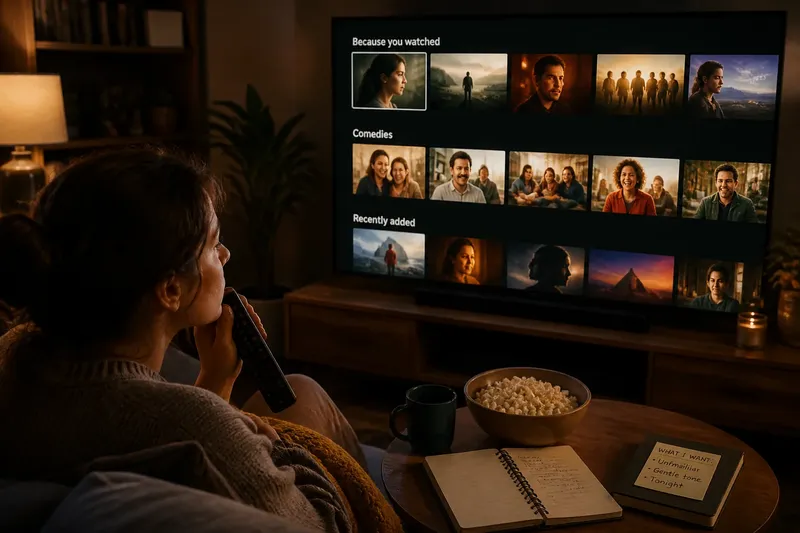
Imagine you want an unfamiliar film with a gentle tone, and a service shows you a “Because you watched” row, a comedy row and a “Recently added” row. You read the descriptions of a few titles in the comedy row and find one that sounds gentle, while the others seem frantic; the result is a plausible choice based on its stated premise, not simply its shelf or artwork. If none of those descriptions fits, you can try a different row rather than treating the first category as a verdict.
When rows mislead?
Why does one title appear in several rows?
A service may group a title under several labels because it shares different features with each collection. Treat repeated placement as a hint about those features, not as independent confirmation that you will enjoy it. The synopsis and your own preferences are better checks of fit.
What does “because you watched” mean?
The label suggests a link to something in your viewing history, but the shared feature may be broad: a genre, performer, theme or other connection. Check the title details to see whether that link is one you care about. If the connection is unclear, try a different row or search directly.
Should I trust a popular label?
Popularity is a clue about how a title is being presented, not a description of its tone or subject. Read the synopsis and any content information relevant to you before choosing. If the premise does not appeal, the label is no reason to keep considering it.
What if no row looks relevant?
Try searching for a specific genre, theme or performer rather than moving through unrelated shelves. You can also leave the screen and decide later if none of the available descriptions sounds appealing. A row is an optional route to discovery, not an obligation to find something.
Check a title properly
Once a listing catches your eye, use the details page to check what the row cannot tell you. Look at the synopsis, whether it is a film or series, and any language, subtitle or content details that affect your choice. If the service offers a trailer, use it to clarify the tone, but remember that a trailer is a brief selection of scenes rather than a full account of the title.
If a title interests you but does not suit the moment, save it only if you expect to return to it. Otherwise, leaving it unsaved keeps a passing curiosity from becoming another item to sort through later. The same principle applies to rows: move on when their labels and descriptions stop helping.
More streaming recommendations are useful when their labels help you find a promising premise, not when they keep you moving from shelf to shelf. Check what a row represents, read the details of a likely title, and decide from the story and practical information in front of you. If those clues do not add up to a good fit, the next useful action may be to stop browsing rather than open another row.