How to Keep a Streaming Watchlist Worth Opening
A streaming watchlist review helps you clear stale saves, spot titles you still want, and make your next viewing choice without rebuilding the whole list.
Which saved titles would you still choose if you opened your streaming watchlist tonight? A streaming watchlist review can answer that without sorting films by mood, attention or who is watching: check whether each save still has a clear reason to stay.
Think of the list as a shelf by the door, not an archive. Its job is to keep a few wanted titles within reach, while stale reminders and duplicates can go.
Check each saved title
Open the list and consider the title itself, not the neatness of its place in the app. For each entry, ask whether you remember why you saved it, whether you still want to watch it, and whether the service still offers it.
- Check your interest: If the title still makes you curious, keep it; if not, remove it or move it to a separate “maybe” note if you genuinely want to reconsider later.
- Check the reason you saved it: If you can name a specific reason, keep it; if the reason has disappeared, remove it or leave it temporarily while you decide.
- Check availability: If the title is still playable in your service, keep it; if it is unavailable, remove it or record the title elsewhere if you intend to search for it on another service.
- Check for duplicates: If the same film or series appears twice, keep one entry; if the entries refer to different versions, retain the one you actually mean to watch.
- Check for a completed title: If you have finished it and do not plan to revisit it, remove it; if you want to rewatch it, keep it with a note that makes that intention clear.
- Check whether the list is shared: If another person added the title, ask before deleting it; if nobody claims it, keep it only if you want to watch it yourself.
These decisions do not need a perfect rule. A saved title is a reminder, not a commitment, and removing one does not mean it was a bad choice at the time.
Use a simple review
Choose a manageable portion of the list and review it in place. If your service has no notes or folders, use its existing save and remove controls rather than building a second system that becomes another list to maintain.
- Open the watchlist and choose a visible section to review.
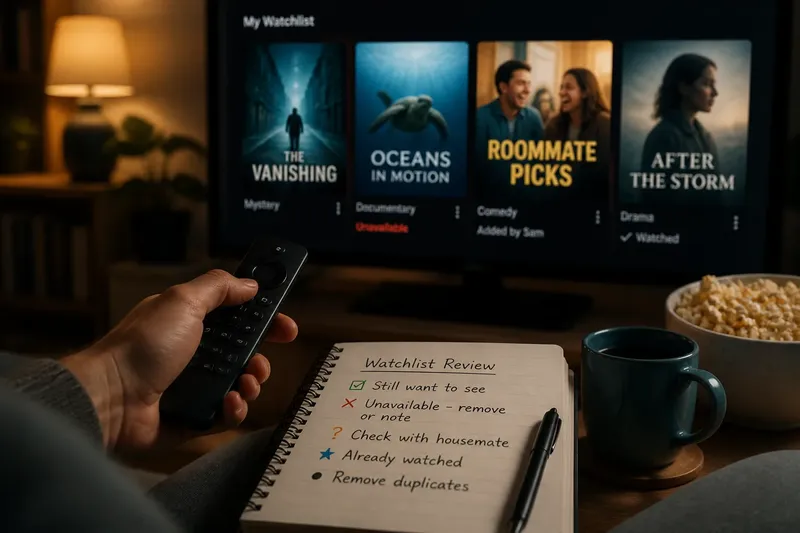
- For each title, check interest, the reason for saving it, availability, duplicates and whether it has already been watched.
- Apply the relevant decision: keep, remove, or set aside for a specific unresolved question.
- For a shared list, confirm with the person who saved a title before removing it.
- Close the list when the reviewed titles have clear outcomes; leave the rest for another occasion.
Say you have a fictional watchlist with a mystery you still want to see, a documentary whose listing is unavailable, and a comedy a housemate saved. You keep the mystery, remove the documentary from this service or note it for a later search, and ask your housemate before changing the comedy entry. The result is a shorter list with a clear next choice and no silent deletion of someone else’s pick.
Keep shared saves clear
Shared watchlists need a little more care because “saved” may mean “I want this” or “someone mentioned it”. If the app shows who added an item, use that information; if it does not, ask before removing a title that may belong to another viewer.
When several people use one account, agree on a simple distinction such as personal saves versus titles for everyone, if the service supports separate lists. If it does not, a brief message or a separate shared note can prevent one person’s tidy-up from erasing another’s plan.
When should a title stay?
Should I remove a title I have ignored?
Ignore it only if you no longer feel curious or cannot remember why it matters to you. If you still want to watch it but have not chosen it, keep it and revisit the reason later.
What if a title is unavailable?
Check the service’s current listing before deciding, since availability can differ between apps. If it is not playable there, remove it from that watchlist or note its name elsewhere if you plan to look for it on another service.
Can I delete someone else’s saved title?
Ask the person who added it, especially on a shared account. If you cannot tell who saved it, leave it alone until you have checked with the other viewers.
How often should I review my watchlist?
Review it when the list becomes difficult to scan or when you are already choosing something to watch. A light, occasional check is more useful than a strict schedule that turns viewing into administration.
Keep only useful structure
Use folders, tags or notes only if they make a real decision easier and your streaming service supports them. A genre label can help you search for a kind of story; it is not needed if you can already find the title quickly.
Do not try to make every saved title fit a carefully designed scheme. The streaming watchlist review is successful when wanted titles are easy to recognise, shared entries are treated fairly, and items that no longer belong are no longer in the way.
Before you close the app, check that any title you kept is still the one you meant to save. That small final glance catches accidental taps and leaves the list ready for the next time you want to choose.